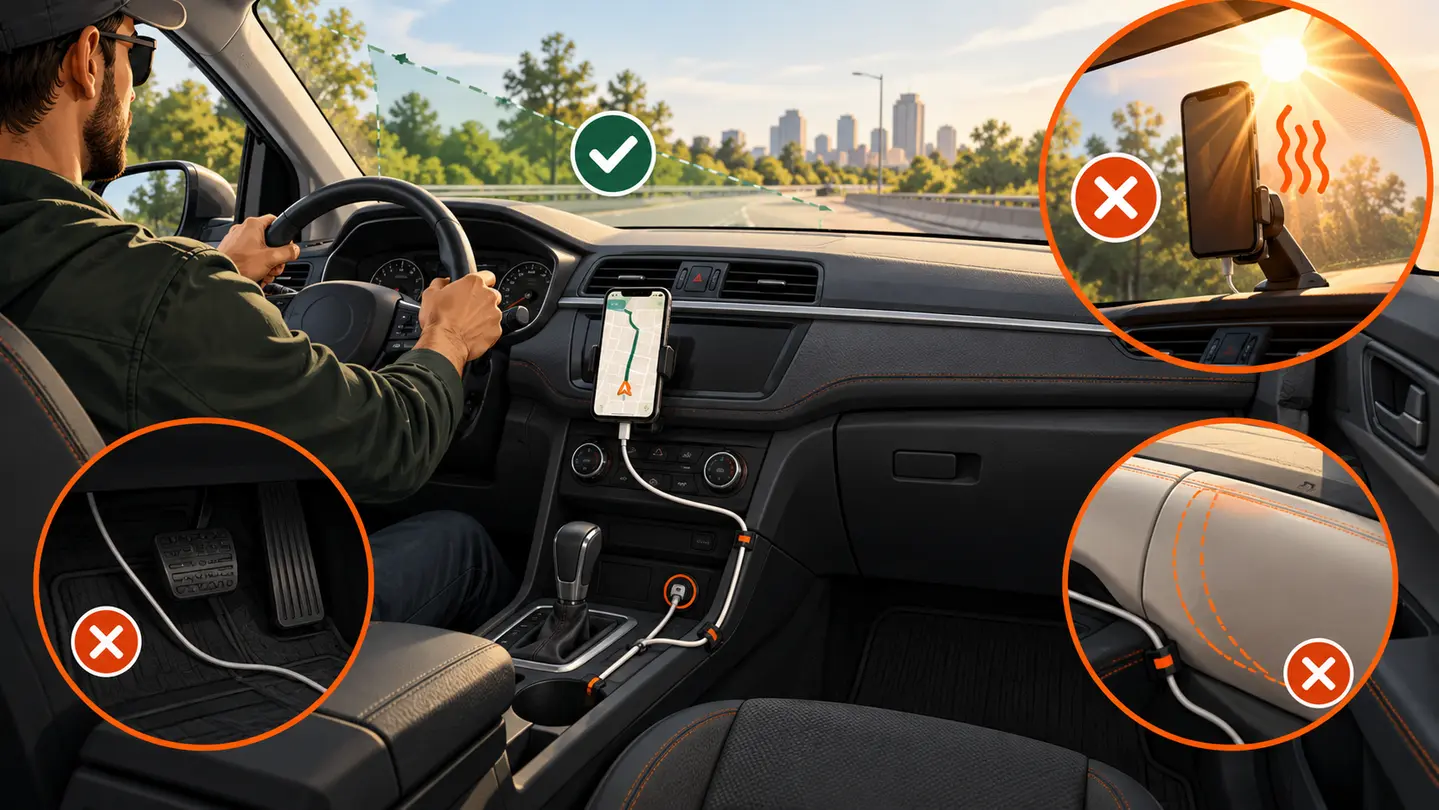
Use a phone-and-vehicle worksheet to check placement, attachment, case fit, cable clearance, and removal before buying a mount.
By GigStriker Editorial TeamPublished September 6, 2026Updated October 17, 2026
Evidence label: Research synthesisThis page does not contain product rankings or hands-on performance claims.
A mount has to fit two things: your complete phone setup and a suitable location in your vehicle. “Universal” is not a fit result. Start with the worksheet, compare attachment choices, then perform the parked check below.
Phone mount fit worksheet
Copy these fields into your notes. Use the phone, case, attachments, and cable you actually carry. Leave a candidate undecided when its maker does not publish a needed dimension or compatibility detail.
Record your setup
Compare with the candidate
Phone and case model: ___ Width × height × thickness: ___
Holder’s stated device range and usable cradle depth, including the case
Total phone-plus-case weight: ___ Wallet, grip, battery attachment, or plate: ___
Published load and attachment compatibility; include every accessory that stays attached
Button positions and camera bump: ___
Arms and backing must not press buttons or force the phone to sit unevenly
Charging connector and exit direction: ___ Space for the plugged-in cable: ___
Bottom support, arm, and dashboard leave the connector clear without a sharp bend
Proposed location and surface: ___ Usable base area or vent geometry: ___
Base dimensions, approved surface, clip geometry, and installation instructions
Viewing position and required arm reach: ___ Portrait / landscape needs: ___
Adjustment range with road view, controls, mirrors, and airbag areas unobstructed
Removal direction and finger room: ___
Release button and lift-out path remain accessible while parked, without pulling on the base or cable
For a shared vehicle, complete the sheet for each regular driver and phone. A fit with one seat position, case, or cable does not settle the other combinations.
Which attachment can your car support?
Attachment
Check before selecting it
Reason to rule it out
Windshield suction
Permitted location, glass area, base size, and arm reach
It obstructs the view or conflicts with local placement rules
Dashboard base
Texture, curvature, coatings, base footprint, preparation, and curing instructions
The maker does not approve that surface or the base rocks
Vent clip
Slat direction, thickness, depth, movement, and clip access
The clip cannot seat as instructed, the vent twists, or the phone conflicts with airflow or controls
Console / cupholder base
Socket size, nearby controls, arm reach, and the driver’s viewing position
The screen is too low for a suitable glance or the assembly obstructs controls
Check current placement rules where you drive and the vehicle’s instructions before installation. Do not assume a removed adhesive pad can be reused. For a magnetic holder, verify the exact case and attachment requirements; the phone model alone is not enough.
Parked-vehicle fit check
Set the normal driving position. Position the phone before committing an adhesive base, and follow all installation and curing instructions.
Insert the cased phone without forcing it. Check buttons, camera projection, support arms, and the charging connector.
Plug in the usual cable and try every intended orientation. Leave slack at the phone without a loose loop near pedals, steering, shifter, seat tracks, or airbags.
Check road and mirror sightlines, warning displays, and normal control movement. Configure navigation while safely parked.
Remove and replace the phone while parked. A release that needs an awkward pull or bends the vent fails the workflow check.
Record “fits,” “does not fit,” or “unknown” for every worksheet row. Resolve unknowns before treating the setup as compatible.
What this check cannot prove
A parked fit check does not establish retention over rough roads, adhesive life, heat tolerance, or adjustment drift. Nor does a mount make phone interaction safe while moving. If it shifts or releases, stop in a safe, lawful place before adjusting or retrieving it.
Instructional illustration. Phone fit includes sightline, controls, cable movement, heat, and the consequences of a release. Digitally created and reviewed by the GigStriker Editorial Team; it is not a product test or proof of performance.
The holder and charging method must agree
Vehicle attachment and phone retention are separate choices. A vent or dashboard base can support different holder designs, each with its own compatibility checks.
Clamp or cradle
Look beyond the advertised width range. Check usable depth with the case installed, where the arms close, whether the lower supports move, and how much finger room the release needs.
Magnetic or wireless-charging holder
Check the exact phone, case, ring or plate, and charger combination against the maker’s instructions. A magnetic connection alone does not establish wireless-charging compatibility or retention under road movement.
Apply it to a shift
A phone can fit between the arms yet fail the complete setup when the plugged-in connector catches the lower support. Record that as a failed fit rather than forcing the cable.
Affiliate disclosure: This section contains Amazon affiliate links. As an Amazon Associate I earn from qualifying purchases.
SPECIFICATION-VERIFIED CANDIDATES
Products worth checking for fit—not untested winners
These are research candidates selected because the manufacturer publishes relevant specifications. Inclusion is not a ranking, endorsement, or hands-on performance claim.
iOttie Easy One Touch 6 Dash & Windshield Mount
Why it made the shortlist: The maker specifies dashboard or windshield attachment, a telescoping arm that extends from 5 to 6.75 inches, cradle access to the phone’s USB port, and a one-touch release system. Those characteristics make it useful for the placement, reach, case, and cable checks in this guide.
Verify before buying: Confirm local placement rules, dashboard surface compatibility, phone-and-case dimensions, sightline, control clearance, installation instructions, and safe release direction. GigStriker has not tested its retention, adhesive life, rough-road stability, or hot-cabin durability.
Repeat the device dimensions, button, retention, connector, and magnetic or charging compatibility checks.
What if the product lists only “universal”?
Ask the maker for the missing range or compatibility detail. Treat the fit as unknown rather than treating the label as a guarantee.
Common mistakes
Buying from bare-phone dimensions while using a thick case or attached wallet.
Choosing an attachment before checking the vehicle surface and installation instructions.
Questions drivers ask
Are magnetic mounts automatically less secure?
No conclusion follows from attachment type alone. Retention depends on the complete phone, case, holder, vehicle attachment, and operating conditions.
Can I transfer a mount between cars?
Only after checking both installations and the maker’s reuse instructions. Different vents, dashboard surfaces, driving positions, and cable paths can change the fit.