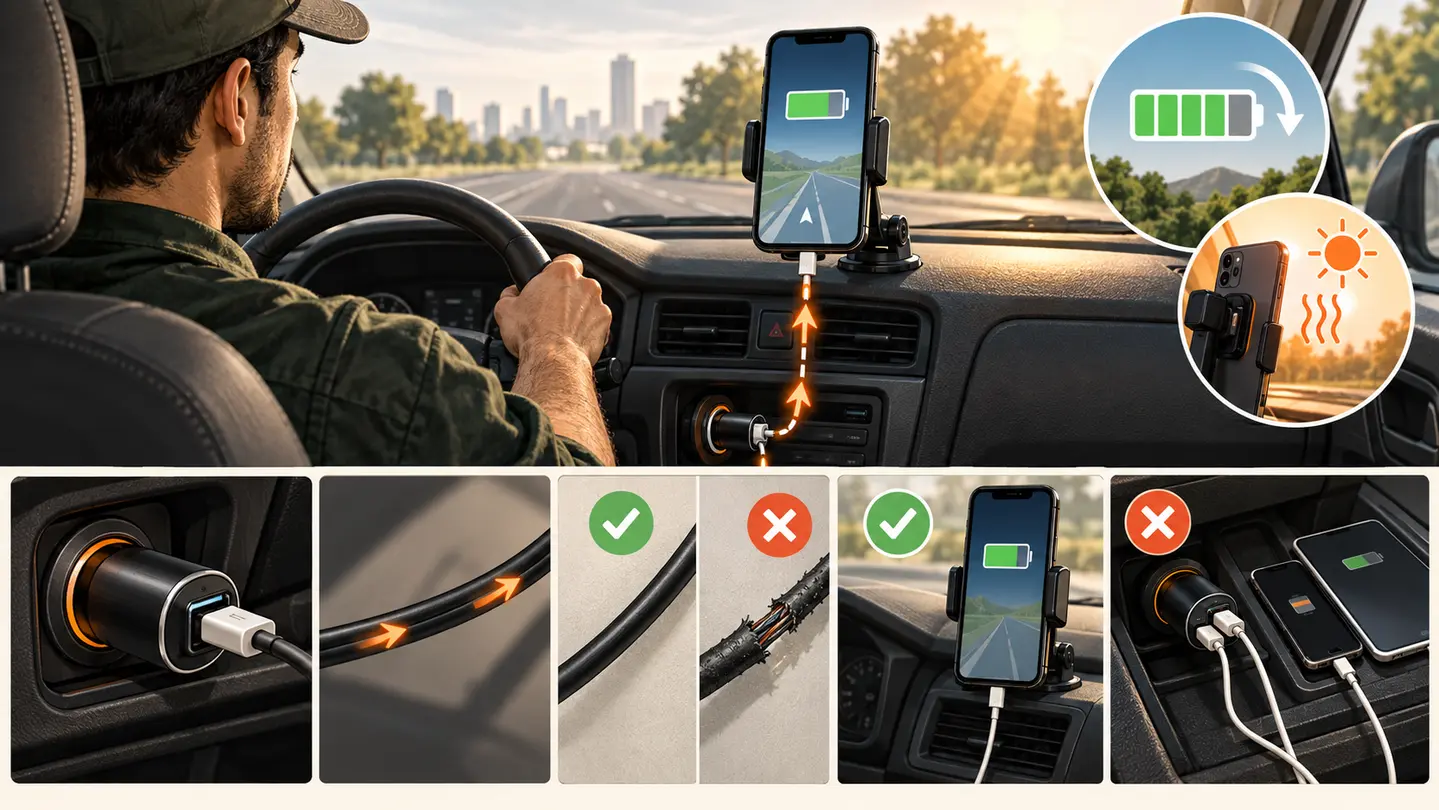
Treat charging as a complete power path: vehicle supply, adapter, cable, phone, workload, placement, and temperature.
By GigStriker Editorial TeamPublished September 6, 2026Updated September 6, 2026
Evidence label: Research synthesisThis page does not contain product rankings or hands-on performance claims.
Navigation, location services, a bright display, cellular data, audio, and repeated app use can all be present during a delivery shift. The useful target is not the largest number printed on a charger. It is a system that keeps the phone at a workable battery level under your actual load.
Measure the problem before replacing gear
Begin a representative shift with the battery percentage and time recorded. Note whether the phone is connected, which navigation and delivery apps are active, screen brightness, wireless connections, and whether the cabin is hot or cold. Record the percentage again after 30 and 60 minutes.
If the percentage rises, the system has charging headroom in those conditions. If it stays level, it may be adequate but have little reserve. If it falls, isolate the weak point instead of replacing everything.
Devices may reduce or pause charging to protect themselves
Verify compatibility, not just advertised output
The phone, adapter, and cable must support compatible charging behavior. A multi-port adapter may divide output when another device is connected. A cable can fit physically yet be damaged or unsuitable for the desired power. Check the phone maker’s charging requirements, the adapter’s per-port specifications, and the cable rating.
Test with one change at a time: first another known-good cable, then another adapter or port, then a lower workload. Single-variable changes make the cause easier to identify.
Control heat and cable movement
Direct sun through a windshield can warm a mounted phone even in an air-conditioned cabin. Device manufacturers may slow or pause charging outside acceptable temperatures. Keep the phone out of prolonged direct sun where possible, never place it where it blocks safe driving, and follow device warnings rather than trying to defeat thermal protection.
Leave enough cable slack for mount adjustment without letting the cable enter the steering column, pedals, shifter, seat tracks, or airbag zones. Repeated bending at the connector is a reliability problem even when charging still works.
Build a measured reserve
Choose a minimum battery threshold that leaves enough time to finish or safely pause work. A power bank can be a backup when it is charged, rated for the phone, stored securely, and connected while parked. It should not become a loose object or another cable across the driver area.
Pre-shift power check
Phone begins above the reserve threshold.
Adapter is fully seated and the cable has no exposed damage.
Charging begins before leaving the parking position.
Cable routing stays clear of controls and airbags.
Backup power, if carried, is charged and secured.
A one-hour test shows stable or rising battery under representative use.
Evidence boundary
GigStriker has not ranked chargers, cables, or power banks. A reliable comparison would need the same phone, battery state, ambient temperature, app load, vehicle supply, cable, ports, and measurement interval. Until that testing exists, verify the power path you own.
Pair this guide with the phone mount fit guide so the power and mounting systems work together.
Instructional illustration. Charging performance depends on the complete power path and the phone's real workload. Digitally created and reviewed by the GigStriker Editorial Team; it is not a product test or proof of performance.
Understand the phone’s energy balance
Battery percentage reflects energy entering minus energy being consumed. Navigation, screen brightness, weak cellular signal, camera use, wireless connections, and heat can change the balance even when the charging icon is present.
Build a baseline and a stressed run
Measure one ordinary hour and one demanding hour using the same charger. Record battery start and finish, temperature warnings, app load, screen brightness, signal conditions, and whether another device shared the adapter.
Interpret three outcomes
Rising percentage indicates reserve under those conditions. A flat percentage means the system is just keeping pace. Decline means demand exceeds usable input or charging has been interrupted or limited.
Inspect connection wear
Repeated entry and exit can loosen adapters and strain connectors. Watch for intermittent charging, unusual heat, debris, bent ends, or a cable that only works at one angle; remove damaged equipment from service.
Apply it to a shift
A 20-watt label does not prove 20 watts reaches the phone. The vehicle supply, adapter port, cable, protocol, battery state, and temperature all participate.
Affiliate disclosure: This section contains Amazon affiliate links. As an Amazon Associate I earn from qualifying purchases.
SPECIFICATION-VERIFIED CANDIDATES
Products worth checking for fit—not untested winners
These are research candidates selected because the manufacturer publishes relevant specifications. Inclusion is not a ranking, endorsement, or hands-on performance claim.
Anker 535 Car Charger (67W)
Why it made the shortlist: The maker specifies two USB-C ports, one USB-A port, 12–24V input, and up to 67W total output, with output allocation depending on which ports are used. That makes it a useful candidate for a measured single-device and shared-port power-path test.
Verify before buying: Check the phone’s supported protocol, cable rating, vehicle socket, selected port, and the maker’s multi-port output table. GigStriker has not measured delivered power, thermal behavior, socket retention, or long-shift reliability.